Talking avatar quality: Premium or Economy? A side-by-side comparison
We generated the same talking avatar video in both AvataReel qualities, with the same photo, voice and script. See the difference in the face, the cost in credits and when to use each one.
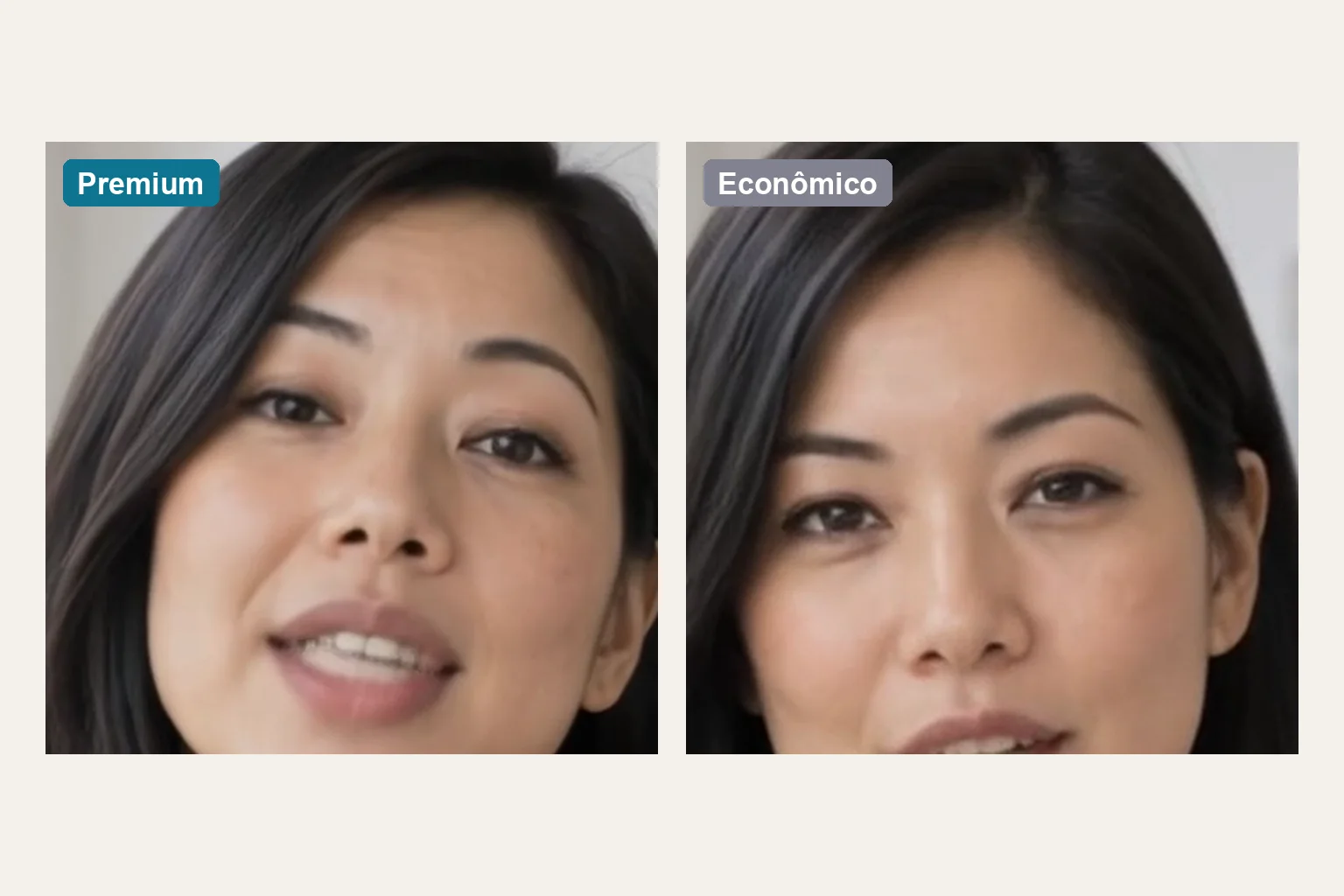
AvataReel generates talking avatar videos in two qualities: Premium and Economy. To show the real difference, we generated the same video twice, with the same photo, the same voice and the same script. Only the quality changed. Neither video was edited.
Summary: Premium shows more skin texture, sharper eyes and clearer teeth. Economy has a smoother, slightly softer face, and costs about half. On a phone screen, both work. The difference shows up in close-ups and on big screens.
How we ran the test
| Avatar | Helena, from the catalog. A single input photo |
| Script | 229 characters, 13 seconds of speech |
| Voice | The same ready-made voice, generated once and used in both videos |
| Model | AvataReel Motion, with the same settings in both qualities |
| Editing | None. No captions, no filter, no cuts |
See the step-by-step of how this video was made in How a photo becomes a talking avatar.
The difference in the face, up close
This is the same moment of the speech, cropped to the face:

| What to look at | Premium | Economy |
|---|---|---|
| Skin texture | Visible pores and marks | Smoother skin, almost no texture |
| Eyes | Defined iris and lashes | Softer outline |
| Teeth and mouth | Separate teeth, sharp lip edge | Less defined teeth and lips |
| Hair | Separate strands at the tips | More uniform locks |
| Background and clothing | Visible fabric weave | Softer weave |
| Lip sync | Same in both | Same in both |
| Movement and blinks | Natural | Natural |
Lip sync and movements don't change between qualities. What changes is the amount of detail in each frame.
Why the difference exists
The model generates the video at one resolution and then upscales to the final size:
| Quality | Generated at | Delivered at | File in the test (13 s) |
|---|---|---|---|
| Premium | 768×1344 | 1080×1920 (1080p) | 11.4 MB |
| Economy | 512×896 | 720×1280 (720p) | 5.6 MB |
Premium generates 2.25 times more pixels per frame. More pixels at generation mean more real detail in the face. The final upscale brings the video to the standard size for social networks, but doesn't invent detail that wasn't generated.
In the test, Economy generation took about half the time of Premium.
How much each one costs
Price is per second of speech, with a minimum of 3 seconds:
| Duration | Economy | Premium |
|---|---|---|
| 5 s | 4 credits | 7 credits |
| 15 s | 6 credits | 11 credits |
| 30 s | 10 credits | 18 credits |
| 60 s | 18 credits | 33 credits |
| 90 s | 26 credits | 47 credits |
Credit packs are sold in USD by card ($9, $19, $39 and $79), and the credit gets cheaper in the larger packs and in the plans. See the values at /pricing.
If the avatar holds a product, product preparation adds credits in both qualities. The total always appears in Confirm your video, before you generate. If generation fails, the credits come back.
Generate the same script in Economy and Premium and compare on your phone.
Create my video →When to use each one
Use Economy when:
- The video is going to Reels, TikTok or Stories and will be watched on a phone.
- You're testing scripts and hooks. Generate several versions and pick the winner.
- The avatar appears in a medium shot, with the face taking up part of the screen.
- Volume is high, such as daily videos or several ad variations.
Use Premium when:
- The video has a close-up on the face or goes to a big screen, such as YouTube, TV or a presentation.
- The brand sells beauty, fashion, skin or finish, and texture matters.
- It is the final version of an ad that already won the test in Economy.
- The avatar is you and the likeness needs to be as close as possible.
A strategy that works: test in Economy, publish the winner in Premium. Because sync and movements are the same, a script that worked in one quality works in the other.
What quality doesn't fix
Video quality doesn't make up for a bad photo. If the input photo is blurry, dark or has the face turned away, Premium just shows those problems more sharply. Before you choose the quality, check the photo:
- A real photo, front-facing, looking at the lens.
- From the top of the head to the chest, at arm's length.
- Facing the light, without sunglasses.
The full guide is in How to create a talking avatar from a photo.
Start now
Create your account, choose an avatar or upload your photo and generate the same script in both qualities. The first avatar with your photo is free.
Frequently asked questions
What is the difference between Premium and Economy?
Premium generates the video at a higher resolution and delivers it in 1080p. Economy generates at a lower resolution and delivers in 720p. In Premium, skin, eyes, teeth and hair look sharper. Economy costs about half.
Is Economy good enough for ads?
It is, mainly when the video is watched on a phone and the avatar takes up part of the screen. For a close-up on the face, or a brand that depends on visual finish, prefer Premium.
How much does each quality cost?
A 15-second video costs 6 credits in Economy and 11 in Premium. A 30-second one costs 10 and 18. The exact amount appears on the confirmation screen before you generate.
Do both qualities support product and scene?
Yes. Both output 9:16 at 25 frames per second and support a product in the video.
Is the Premium 1080p generated by the AI?
Not exactly. The model generates the video at 768×1344 in Premium and 512×896 in Economy. Then an upscale brings it to the final size. The upscale doesn't create new detail: the difference in sharpness comes from the generation resolution.
Upload a photo, record your voice and type the script. Your first avatar is free.
Create my free avatar →